

How to Use TradingView with Deriv Platform
Boost your trading on Deriv by integrating TradingView charts 📈. Learn setup, customization, common issues, and tips for smarter trades today!
Edited By
George Spencer
Logging into your Deriv account using your email address is straightforward once you know the steps. Whether you're a trader starting your day or an investor checking market movements, quick and secure access to your account is essential. This guide walks you through the exact process to sign in, ensuring you avoid common mistakes and keep your account safe.
To log in, you should first visit the official Deriv website on your preferred browser. Use a trusted device—your laptop or smartphone—and make sure your internet connection is stable. Avoid public Wi-Fi or unsecure networks, especially when dealing with financial platforms.
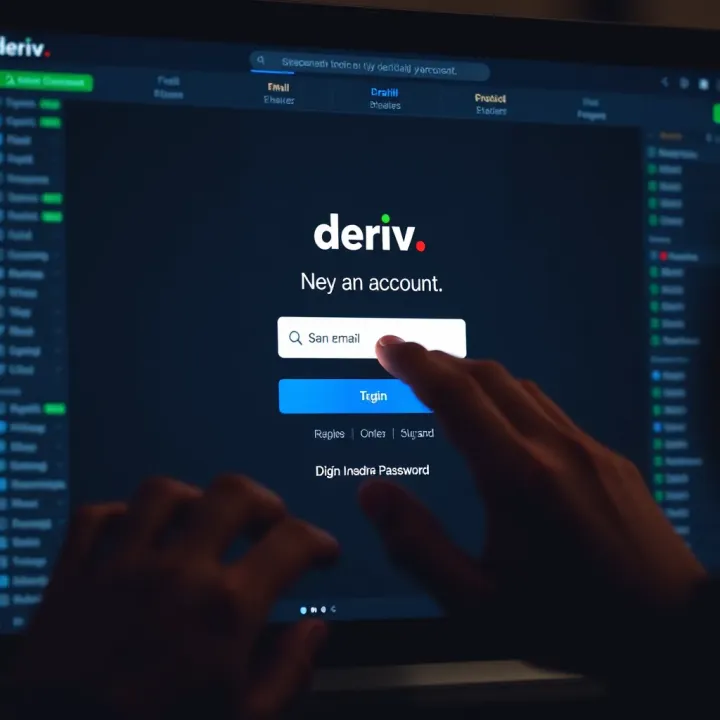
At the login page, enter the email address you used to register your Deriv account. This is the key identifier for your account, so accuracy is vital—double-check for typos, such as mixing up letters or missing dots between your name parts. Next, input your password. If you created a strong password during registration, it should include a mix of uppercase and lowercase letters, numbers, and special characters. Avoid using easily guessed passwords like "password123" or your birthdate.
Tip: To enhance security, Deriv supports two-factor authentication (2FA). After entering your email and password, you may be asked to provide a one-time code sent to your verified phone number or authentication app. Activate 2FA as it significantly reduces the risk of unauthorised access.
If you experience trouble logging in, common issues include:
Forgetting your password
Incorrect email address due to typos
Account temporarily locked after multiple failed attempts
Deriv has a "Forgot Password" link on the login page. Clicking this lets you reset your password via a secure email link. For account lockouts, waiting about 15 minutes before retrying or contacting Deriv support helps.
For many Nigerian users accessing Deriv, it is advisable to keep your account details updated, especially your phone number and email. This way, account recovery processes are smooth. Also, check regularly that you can receive emails from Deriv; sometimes emails end up in spam or junk folders.
Lastly, avoid public computers for login and never share your password or 2FA codes with anyone, regardless of their claim. Many traders have fallen victim to scams by loosely sharing login details.
Following these steps will ensure your entry into your Deriv account using your email is fast, safe, and hassle-free.
To navigate Deriv effectively, understanding its platform and available login options is essential. This knowledge helps you access your trading or investment accounts smoothly and ensures you can manage your funds without unnecessary delays. For example, Nigeria’s fluctuating internet connectivity means knowing multiple login methods can save you time during peak periods when your preferred method may falter.
Deriv is a well-known online trading platform offering options in forex, commodities, indices, and cryptocurrencies. It attracts a broad range of users including traders, analysts, brokers, and entrepreneurs seeking direct market exposure or hedging opportunities. Many Nigerians trust Deriv for its user-friendly interface and diverse asset options, which cater to both beginners and experienced investors. Whether you are a small-scale trader using ₦10,000 to start or an institutional player making large transactions, Deriv’s platform provides access to global financial markets.
One primary method to access your Deriv account is through your registered email address. This option is straightforward and widely preferred because it ties directly to your unique account credentials. For instance, if you register with a Gmail or Yahoo email, your email serves as your username for login. This method keeps your account secure by combining your email and password, and often supports additional security steps such as two-factor authentication (2FA). Email login also caters well to those who prefer not to link social media accounts with trading platforms, ensuring privacy.
Deriv also offers flexibility by allowing users to log in through social media accounts like Facebook or Google, and even with mobile phone numbers. These alternatives are handy if you prefer quicker access or have trouble remembering email credentials. For example, logging in via mobile number can be faster when you're on the go and need quick access without typing a full email address. However, these options may depend on your device compatibility and can expose your account to risks if linked to less secure social media profiles. Always evaluate these options to fit your security comfort and convenience.
Having several login options means you can pick what’s most secure and convenient for your situation, especially in a place like Nigeria where internet access and device availability vary widely.
Using the right login method can reduce downtime and keep your investments safe. So, while email login is solid for many, considering alternatives could come in handy sometimes.
Knowing how to log into your Deriv account using your email is key to smooth trading and managing your investments without hassle. This guide walks you through each step clearly, helping you avoid common pitfalls and keep your account secure. By following these steps precisely, you will save time and reduce stress, especially if it’s your first time or if you are juggling multiple accounts.
Before logging in, make sure you have the correct email address that you used to register with Deriv. This is important because the platform won’t recognise any email that isn't linked to your account. For instance, some may confuse work or secondary emails with their primary registered email, which ends up blocking access and wasting time.
Having your email readily accessible on your device simplifies the login process and avoids the need to recover your account details later. It’s like bringing your ID to the bank; without it, you can’t proceed.
Your password is the main guard for your Deriv account. Use a strong, unique password that mixes letters, numbers, and symbols. Avoid simple passwords like your birthdate or common words that hackers can easily guess.
Also, never share your password, even if someone claims to be from Deriv support. A secure password protects you from unauthorised access that can jeopardise your funds and personal data. If needed, use a password manager to keep track.
Open your browser and carefully enter the official Deriv web address. Be mindful to avoid phishing sites which may appear similar but are traps set to steal your details. The real Deriv site always has a secure HTTPS connection.
Accessing Deriv through the official site not only ensures security but lets you tap into full platform features. For example, some alternative URLs or unofficial apps miss crucial updates and functionalities.

Once on the website, look out for the login button which usually presents multiple ways to sign in — such as social media or mobile number. Choose the email login method to enter your credentials safely.
This step is straightforward but important to avoid accidentally logging in with the wrong method, which could complicate account access or delay trades.
Type your registered email address and password accurately. Double-check for common typing errors such as misplaced dots or missing letters. Taking a moment here can save you from frustrating password resets.
Entering your details correctly grants you immediate access to your account without delay.
If you have set up two-factor authentication (2FA), after entering your email and password, you'll be asked to provide a second verification, usually a code sent to your phone or generated by an authenticator app.
2FA adds an extra security layer, making it much harder for outsiders to breach your account, especially crucial when you trade significant sums or sensitive data.
Once authenticated, you reach your Deriv dashboard — the central hub where you monitor trades, check balances, and make decisions. This page gives you instant access to all your portfolio information in real time.
From here, you can start trading confidently, knowing your account is secure and properly logged in.
Always ensure you're on a secure network when logging in, such as your home Wi-Fi, rather than public hotspots, to reduce the risk of data theft or hacks.
Facing trouble logging into your Deriv account through email is not uncommon, especially for active traders and investors who rely on quick access. Knowing how to solve these problems swiftly can save you valuable time and frustration. This section covers common login issues, practical fixes, and when to seek help, ensuring you stay connected to the markets without delay.
Forgetting your Deriv account password happens to many users. The platform offers a straightforward reset feature to help you regain access. Simply click the "Forgot Password" link on the login page, enter your registered email, and follow the prompts. This process sends a reset link to your email, allowing you to set a new password securely.
If you don't spot the reset email in your inbox after a few minutes, check your spam or junk folder, as sometimes email filters misplace important messages. Also, ensure you entered the correct email address during the reset process. Clicking the reset link promptly is vital as it often expires after a short period to protect your account from unauthorised access.
Before attempting further troubleshooting, confirm that the email you use matches exactly the one registered with Deriv. Mistyping or using an alternative email will block your login attempts. You can verify your registered email during account setup emails or by searching your inbox for Deriv communications.
If you’re sure the email is right but still can’t access your account, contacting Deriv’s customer support is the next step. They can check your account status, resolve technical issues, or assist in recovering your login credentials. Make sure you provide clear details like your registered email and any error messages you encountered.
Sometimes, your browser’s stored data can cause login glitches with Deriv. Clearing the cache and cookies refreshes your browser’s memory and often resolves unexpected errors. This step is crucial when you notice login pages not loading correctly or recurring login failures even with the right credentials.
Deriv performs best on popular, updated browsers like Chrome, Firefox, and Edge. Using outdated or unsupported browsers can cause display or compatibility problems during login. Additionally, if one device struggles, try logging in from another one—say, switching from a mobile phone to a laptop—to identify whether the problem is device-specific.
Efficient troubleshooting helps traders and investors regain account access quickly, minimising downtime and avoiding missed market opportunities.
Addressing these common issues directly improves your experience on Deriv and secures your trading activities. Remember, patience and attention to detail go a long way when solving login problems.
Using your email to log into Deriv demands a strong focus on security to protect your funds and personal data. Given the popularity of cyberattacks and scams, especially in Nigeria where digital transactions are growing rapidly, taking practical steps to secure your account is essential. Simple precautions like strong passwords, two-factor authentication (2FA), and recognising phishing attempts can significantly reduce risks.
A strong password is your first line of defence on Deriv. Always pick a combination that blends upper and lower case letters, numbers, and symbols. For example, a password like Naija$2024!Trade is superior to just password123 because it’s harder to crack. Avoid using common words or patterns related to your personal info, such as birthdays or phone numbers. Make each password unique across your online accounts to prevent a security breach on one platform from affecting others.
Changing your password every few months helps reduce the risk of an attacker guessing or harvesting your login details over time. Even if a password hasn’t been compromised, regular updates limit how long someone can misuse it. For instance, setting reminders to update your password every 90 days keeps your account safer, especially when you’re active in trading or investing through Deriv.
Two-factor authentication adds an extra layer by requiring not just your password but also a one-time code sent to your phone via SMS or an authentication app. This means that even if someone steals your password, they cannot access your account without that code. Given the rise of phishing in Nigeria, 2FA drastically cuts down the chances of unauthorised logins.
Deriv makes it easy to enable 2FA in your account settings. Upon activation, you link your phone number or an app like Google Authenticator. Each time you want to log in, enter your password plus the generated code. This setup usually takes just a few minutes but brings security benefits that outweigh the effort.
Phishing scams often trick users with fake sites designed to steal login details. Watch out for slight URL misspellings or unofficial designs. For example, a fake Deriv login might have deri-v.com instead of deriv.com. Always type the URL directly in your browser and avoid clicking on suspicious links received via email or social media.
Before entering your credentials, check that the website uses HTTPS — indicated by a padlock in the browser's address bar. This ensures data sent between you and Deriv is encrypted. Avoid logging in on unsecured or public Wi-Fi networks without VPN protection, as connection risks are higher during busy city traffic or at roadside eateries.
Prioritising these security steps helps you trade and invest with confidence on Deriv, especially given the challenges faced in the Nigerian internet environment.
Applying these practical measures not only safeguards your Deriv account but also enhances your overall online trading security practices.
Nigerian traders and investors using Deriv face unique challenges, especially related to internet access and account setup. Understanding these specifics not only smoothens the login experience but also helps avoid common hiccups. By paying attention to local conditions—like network quality, payment methods, and identity verification requirements—you can trade more confidently and securely.
Internet connectivity in Nigeria can be unreliable or slow, particularly in rural areas or during peak hours. This can cause delays or errors when trying to log into your Deriv account via email. To reduce frustration, try logging in during off-peak hours or from locations with stronger signals. For instance, using stable 4G networks rather than unstable 3G or crowded public Wi-Fi improves the chances of a smooth login.
Simple adjustments also help; clearing your browser’s cache or switching to a lightweight browser can speed up the login process by reducing data demands. If loading times persist, consider using a mobile device on a reliable mobile data plan, as these often perform better than unstable home broadband.
Selecting a dependable network provider and the right data plan is vital. MTN, Airtel, and Glo are among Nigeria’s leading networks offering varied data packages. For traders, investing in bundles that guarantee consistent speeds and data volume is worth the extra cost, especially during trading hours.
It's practical to monitor network coverage in your area. Even if rates look attractive, poor coverage can hinder login and trading activities. Some users switch between SIM cards to optimise access, using one for data and another for calls. Apps like OpenSignal help check network quality nearby before committing to a plan.
Deriv supports linking local bank accounts or popular e-wallets to facilitate fund deposits and withdrawals. Nigerian users typically connect accounts from banks like GTBank, Access Bank, or UBA, or use digital wallets like OPay or PalmPay for quicker transactions.
Proper linking avoids delays in crediting your account, so make sure your bank details match your Deriv profile exactly. For example, the account name and number must be accurate, or transactions might fail. Regularly updating these details ensures smooth payment flows, especially during high-activity periods like ember months.
Nigerian financial rules require identity verification using Bank Verification Number (BVN) and National Identification Number (NIN) for platforms like Deriv. This boosts security and helps prevent fraud.
Before attempting to link payment methods or cash out funds, ensure your BVN and NIN are valid, active, and correctly registered in your Deriv profile. Verification processes can take time, so have your documents ready before starting. This steers clear of unnecessary delays that could disrupt your trading activities or withdrawal of profits.
Always keep Nigerian-specific steps like network choice and identity verification in mind when using Deriv. These small, practical actions save time and reduce frustration when logging in or managing your account.
By considering these additional tips tailored to Nigerian users, your experience logging into Deriv with your email address will be more efficient, secure, and reliable.
Boost your trading on Deriv by integrating TradingView charts 📈. Learn setup, customization, common issues, and tips for smarter trades today!

Explore the Deriv.com app in Nigeria 📱 with step-by-step account setup, trading tools, security tips 🔒, and strategies to boost your trading success!
📈 Discover how to trade smarter on app.deriv! Learn about account types, supported markets, secure setup, and tips tailored for Nigerian traders.

🇳🇬 Nigerian traders: Discover how to use TradingView + Deriv together for smarter trades. Learn setup, features, and tips to boost your trading success! 📈
Based on 7 reviews